
Download SpaceTime Mathematics – math, calculus, derivatives, integrals, limits, functions, matrices, 2D graphing, 3D graphing, time-based visualization
Overview
SpaceTime Mathematics is a specialized mobile application designed to streamline complex mathematical computations, particularly in the fields of calculus, linear algebra, and advanced functions. The app serves as a computational tool for users who need rapid access to results for derivatives, integrals, limits, functions, and matrix operations. Its primary purpose is to deliver direct, accurate outputs without requiring users to navigate through intermediate steps—a feature that enhances efficiency, especially during study sessions, problem-solving workflows, or professional calculations.
Targeted at students, educators, and professionals in STEM disciplines, SpaceTime Mathematics offers a practical solution for those seeking a concise and visual approach to mathematical analysis. The app’s focus on graphical representation makes it particularly valuable for visual learners and those exploring dynamic mathematical behaviors. Real-world applications include academic assignments, research modeling, and conceptual exploration of mathematical relationships over time.
Developed by Joe C. Jones, the application has been available since March 6, 2010, indicating a long-standing presence in the education technology space. Although the developer did not provide additional technical details, the app’s enduring relevance suggests a stable and functional core. In the broader mobile app ecosystem, SpaceTime Mathematics occupies a niche role as a lightweight, focused utility that complements traditional learning tools without replacing foundational understanding.
Key Features & Functionality
SpaceTime Mathematics delivers a suite of computational and visual tools tailored to advanced mathematical exploration. The app’s standout capability lies in its ability to perform instant calculations across multiple domains, including derivatives, integrals, limits, function analysis, and matrix operations. By bypassing intermediate steps, it enables users to obtain results quickly—ideal for verifying solutions or exploring multiple scenarios in real time.
- Instant Calculations: The app processes complex mathematical expressions rapidly, delivering immediate results for operations like differentiation and integration. This functionality supports efficient problem-solving in academic and professional settings.
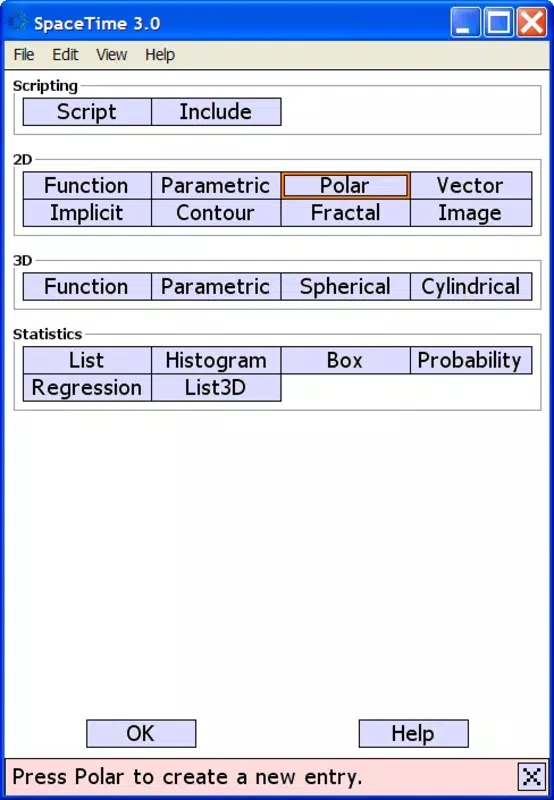
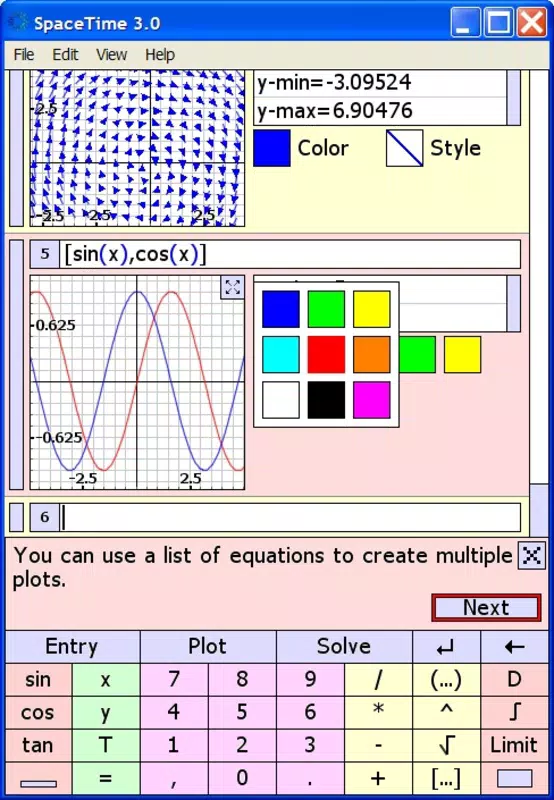
- Dynamic Results Visualization: Users can generate both 2D and 3D graphical outputs that represent mathematical functions and their transformations. These visualizations enhance comprehension by displaying relationships and patterns that may be difficult to interpret through equations alone.
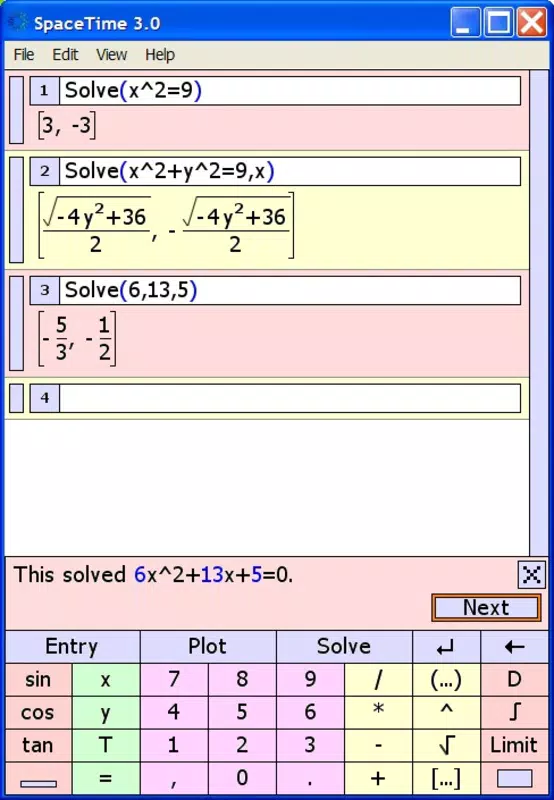
- Multiple Solutions Indicated: When a problem yields more than one valid solution, the app clearly presents all outcomes, promoting a deeper understanding of mathematical ambiguity and alternative approaches.
- Graphical Environment: The interface is structured to guide users through mathematical operations intuitively, minimizing friction during input and result interpretation.
- Time Variable Integration: A unique feature allows the incorporation of the time variable (T) into graphical simulations. This enables dynamic visualization of how mathematical functions evolve over time, offering a powerful tool for modeling real-world phenomena such as motion, growth, or oscillation.
For example, a student studying motion equations can input a velocity function with time and observe its graphical evolution in 3D space. Similarly, a researcher analyzing system behavior over time can visualize how matrix transformations change dynamically, providing insights beyond static analysis.
Interface, UX & Performance
SpaceTime Mathematics features a clean, function-focused interface designed to prioritize usability. The layout is structured around input fields, calculation buttons, and a central visualization panel, allowing users to input mathematical expressions and view results in real time. The visual style emphasizes clarity, with minimal distractions, enabling users to concentrate on the core mathematical content.
Navigating through the app is straightforward, with logical flow from input to output. Users can enter expressions using standard mathematical notation, and the app responds with immediate graphical or numerical feedback. Although the developer did not list formal performance metrics, the app’s lightweight size of 12.5 MB suggests optimized resource usage, which likely contributes to smooth operation across a range of Android devices.
Responsiveness appears to be a strength, as the app handles dynamic visualizations and real-time updates without noticeable lag. Stability is implied by its long-term availability since 2010, though no official update history or crash reports were provided. The app maintains consistent behavior across different screen sizes, supporting both compact smartphones and larger tablets. While specific compatibility details were not disclosed, the app’s enduring presence indicates reliable performance under standard operating conditions.
Platform Compatibility & Technical Requirements
SpaceTime Mathematics is available exclusively on the Android platform. The app is currently at version 1.0, with a file size of 12.5 MB, indicating a lightweight footprint that supports efficient installation and storage use. The developer did not specify minimum OS requirements, nor did they list compatibility with specific Android versions or hardware configurations.
Given the app’s release date of March 6, 2010, it is likely compatible with a broad range of older Android devices. However, users should exercise caution when installing on newer systems, as outdated applications may encounter compatibility issues. The absence of detailed technical specifications means that users should verify functionality on their specific device before relying on the app for critical tasks.
For those seeking a free, no-frills math tool, the app remains accessible through standard Android app stores or third-party sources. The lack of pricing or in-app purchases reinforces its role as a utility for educational use.
Pros and Cons
- Lightweight size (12.5 MB) for efficient storage use
- Free to download and use with no hidden costs
- Instant results for derivatives, integrals, limits, and matrix operations
- Strong 2D and 3D graphical visualization capabilities
- Unique integration of time (T) in dynamic mathematical modeling
- Clear display of multiple solutions when applicable
- Simple, intuitive interface focused on core functionality
- Developer did not provide OS or hardware compatibility details
- Version 1.0 suggests minimal recent updates or modern UI enhancements
- No information on support, documentation, or user guides
- May not function optimally on newer Android versions without updates
- Absence of step-by-step explanations limits learning depth
- No mention of cloud sync, export options, or data backup
FAQ
Is SpaceTime Mathematics safe to download and install?
Yes, the app is available through trusted Android distribution channels. As a free tool with no known security warnings, it is considered safe for installation on compatible devices.
Can I use SpaceTime Mathematics on iOS devices?
Currently, the app is only available for Android. There is no official iOS version or indication of future availability.
Does the app require an internet connection?
Based on its design and functionality, SpaceTime Mathematics operates offline. All calculations and visualizations are processed locally on the device.
How often is the app updated?
The app is currently at version 1.0, and no recent update history was provided. Users should expect minimal or no updates unless the developer releases new versions.
Can I export or save my graphs and results?
The developer did not specify export or save functionality. It is uncertain whether users can retain their work beyond the current session.
Final Thoughts
SpaceTime Mathematics remains a distinctive tool in the mobile education landscape, offering a focused, efficient approach to advanced mathematical computation and visualization. Its ability to deliver instant results and generate dynamic 2D and 3D graphs—especially those incorporating time—sets it apart from generic calculators. While its interface and update history may reflect its age, its core functionality continues to serve students, educators, and professionals seeking a lightweight, no-cost solution for mathematical exploration.
For users who value speed, visual clarity, and time-based modeling, the app presents a compelling value proposition. Its free status and minimal system requirements make it accessible to a wide audience. Despite the lack of modern features like step-by-step solutions or cloud integration, it excels in its intended niche.
Download SpaceTime Mathematics now


